> ## Documentation Index
> Fetch the complete documentation index at: https://docs.tranthor.com/llms.txt
> Use this file to discover all available pages before exploring further.
# Segments
> Using segments to select users.
Segments are one of the most important Tranthor resouces to understand. Segments are used to define a group of users. Segments serve multiple roles.
Segment uses:
* In [Journey Entry Nodes](/resources/journey-nodes/entry) to determine which users enter a journey.
* In [Journey Segment Split Nodes](/resources/journey-nodes/segment-split) to direct users along a specific path within journeys.
Segments are defined by composing one or more segment nodes in a hierarchy.
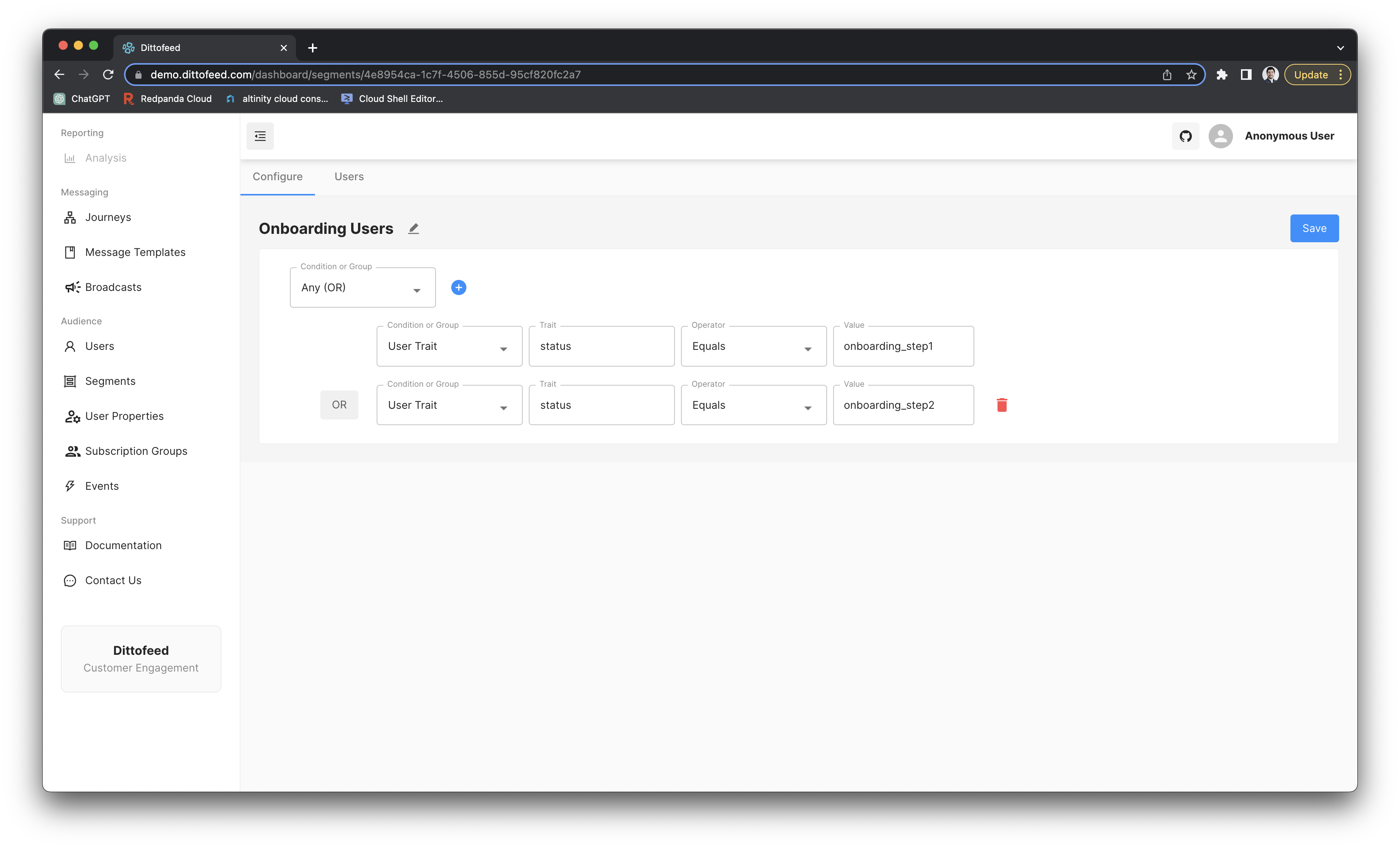 ## Segment Nodes
* [Trait Node](/resources/segment-nodes/trait): Restrict a segment to users with a specific trait value.
* [Performed Node](/resources/segment-nodes/performed): Restrict a segment to users who have performed a specific action.
* [And Node](/resources/segment-nodes/and): Allow any users to join the segment if they satisfy one condition "And" another condition.
* [Or Node](/resources/segment-nodes/or): Allow any users to join the segment if they satisfy one condition "Or" another condition.
* [Subscription Group Node](/resources/segment-nodes/subscription-group): Restrict a segment to members of a subscription group.
* [Manual Node](/resources/segment-nodes/manual): Specify a segment by manually uploading a CSV of users.
* [Random Bucket Node](/resources/segment-nodes/random-bucket): Randomly assigns a predetermined percentage of users to a segment.
* [Keyed Performed Node](/resources/segment-nodes/keyed-performed): Like the performed node, but specialized to [event entry journeys](/resources/journey-nodes/entry#event-entry).
## Segment Nodes
* [Trait Node](/resources/segment-nodes/trait): Restrict a segment to users with a specific trait value.
* [Performed Node](/resources/segment-nodes/performed): Restrict a segment to users who have performed a specific action.
* [And Node](/resources/segment-nodes/and): Allow any users to join the segment if they satisfy one condition "And" another condition.
* [Or Node](/resources/segment-nodes/or): Allow any users to join the segment if they satisfy one condition "Or" another condition.
* [Subscription Group Node](/resources/segment-nodes/subscription-group): Restrict a segment to members of a subscription group.
* [Manual Node](/resources/segment-nodes/manual): Specify a segment by manually uploading a CSV of users.
* [Random Bucket Node](/resources/segment-nodes/random-bucket): Randomly assigns a predetermined percentage of users to a segment.
* [Keyed Performed Node](/resources/segment-nodes/keyed-performed): Like the performed node, but specialized to [event entry journeys](/resources/journey-nodes/entry#event-entry).